

Description
No API key. No account. No setup. Unlike most AI tools, which make you sign up for OpenAI or Anthropic and paste in your own paid API key, AltoGraph runs the AI on our hosted service. Free for 25 items every month.
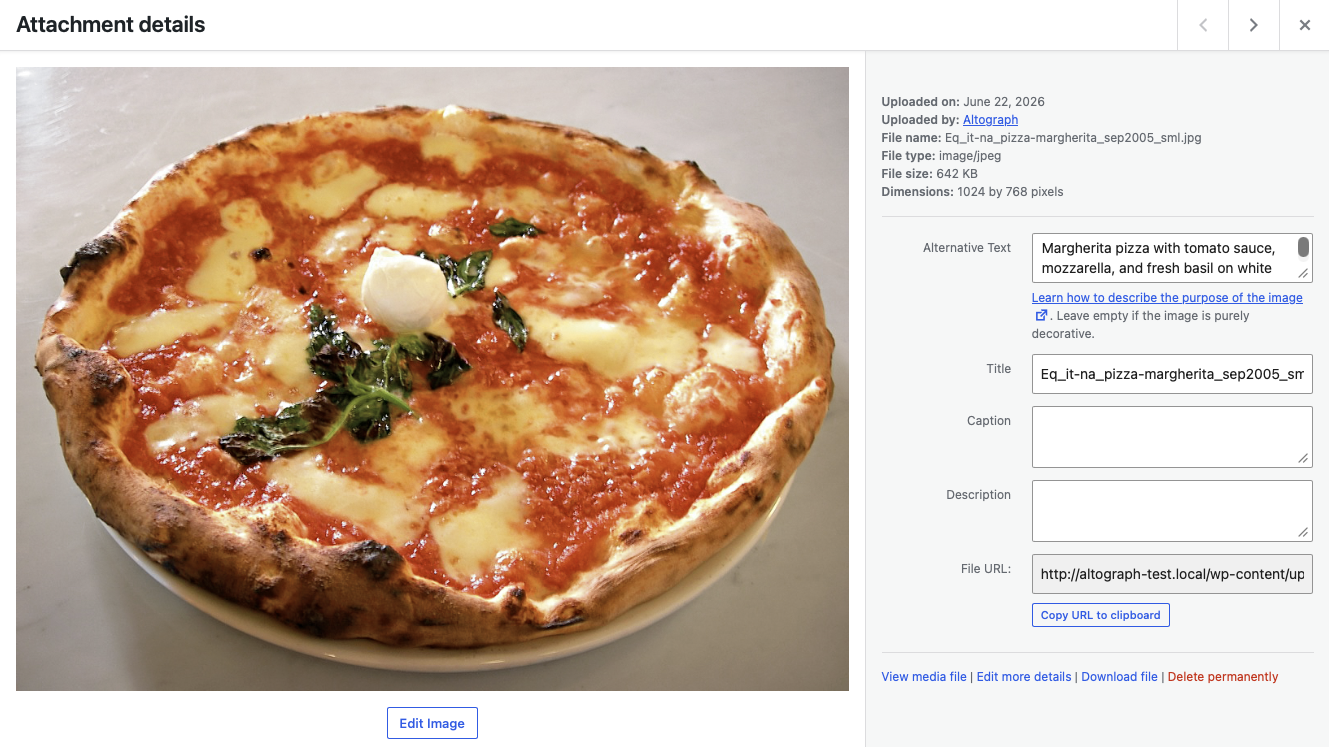
Your Media library gets an Alt text column, so you can see at a glance which images have none, and a Generate button on each one that does not. One click writes alt text from the picture itself. There is a bulk action for a backlog, and a Generate button in the Attachment details panel too.
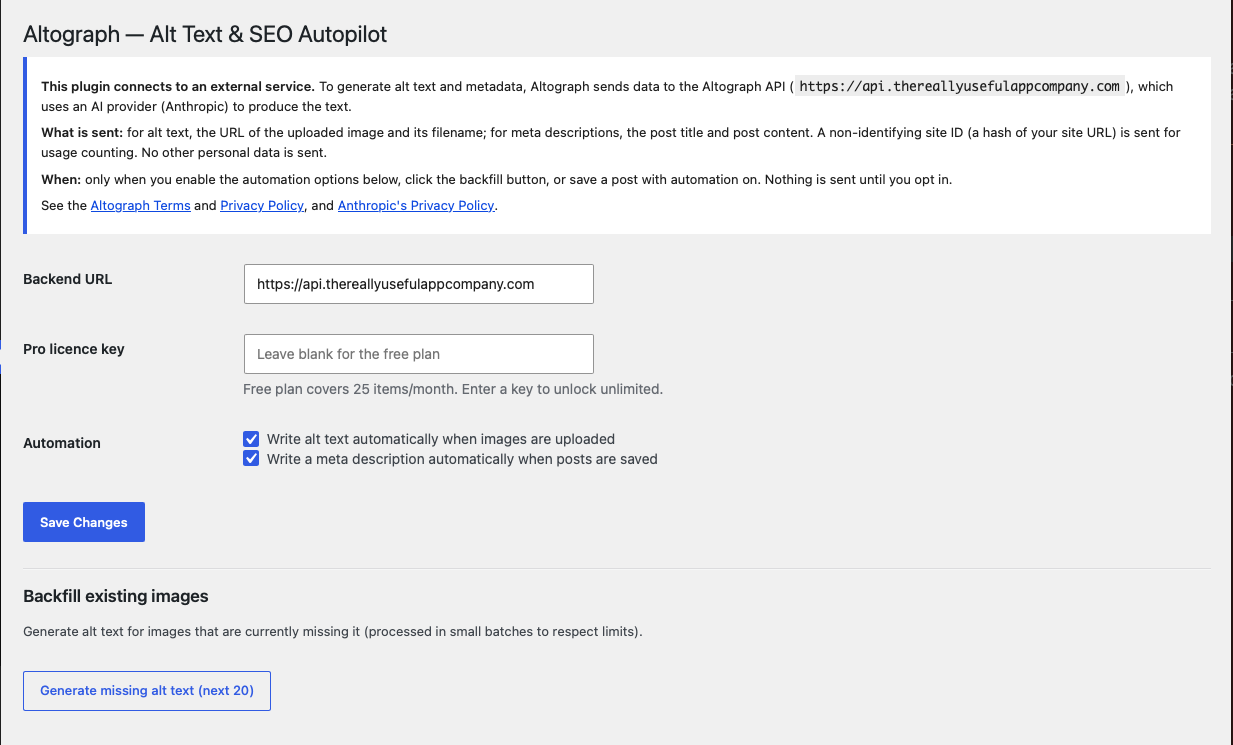
Nothing is sent anywhere until you ask for it. If you would rather not click, you can switch on automatic alt text for new uploads, and automatic SEO meta descriptions with JSON-LD structured data when you save a post, in Settings. Both are off until you turn them on. AltoGraph never overwrites alt text you have written yourself.
Unlike most tools, you don’t need your own AI API key. The AI runs on the AltoGraph service, so there’s nothing to configure. The free plan covers 25 items per month; AltoGraph Pro removes the monthly limit (subject to fair use).
What it does
- Generates descriptive alt text for images from the image itself (better accessibility and image SEO).
- Writes concise, on-topic meta descriptions for posts and pages.
- Adds Article JSON-LD structured data for richer search results.
- Backfills alt text for images that are currently missing it.
- Never overwrites alt text you’ve written yourself.
Privacy-friendly by design
Automation is off until you switch it on, and AltoGraph only ever sends what it needs to do the job (see the External Services section below). A non-identifying site ID (a hash of your site URL) is used for usage counting; no personal data is required.
External services
This plugin connects to the AltoGraph API to generate alt text and metadata. It is required for the plugin’s core features.
- What is sent and when:
- Alt text: when you upload an image (with automation on), run the backfill action, the plugin sends the image URL and filename to the AltoGraph API.
- Meta descriptions: when you save a post or page (with automation on), the plugin sends the post title and post content.
- Usage counting: a non-identifying site ID (a hash of your site URL) accompanies each request.
- Where it goes: the AltoGraph API (default
https://api.thereallyusefulappcompany.com), which uses Anthropic as an AI subprocessor to generate the text. - Service terms and privacy:
- AltoGraph Terms: https://thereallyusefulappcompany.com/altograph/terms
- AltoGraph Privacy Policy: https://thereallyusefulappcompany.com/altograph/privacy
- Anthropic Privacy Policy: https://www.anthropic.com/legal/privacy
No data is sent until you enable automation, click the backfill button, or save a post while automation is enabled.
Screenshots
Installation
- Install AltoGraph from the Plugins screen, or upload the
altographfolder to/wp-content/plugins/. - Activate the plugin.
- Go to Settings AltoGraph.
- Review the external-service notice, then enable “Write alt text automatically” and/or “Write a meta description automatically.”
- (Optional) Enter a AltoGraph Pro licence key to remove the monthly limit.
FAQ
-
Do I need an AI API key?
-
No. The AI runs on the AltoGraph service, so there’s nothing to set up.
-
Will it overwrite alt text I’ve already written?
-
No. AltoGraph only fills in alt text that is missing.
-
Is anything sent automatically without my knowledge?
-
No. Automation is off by default. Data is only sent after you enable it, and exactly what’s sent is listed in the External Services section.
-
What happens when I hit the free limit?
-
Generation pauses for the rest of the month. Upgrade to Pro for unlimited use, or wait for the next month.
Reviews
There are no reviews for this plugin.
Contributors & Developers
“AltoGraph – AI Alt Text Generator & SEO Meta Descriptions” is open source software. The following people have contributed to this plugin.
Contributors
Translate “AltoGraph – AI Alt Text Generator & SEO Meta Descriptions” into your language.
Interested in development?
Browse the code, check out the SVN repository, or subscribe to the development log by RSS.
Changelog
1.0.10
- New: an “Alt text” column in the Media library shows at a glance which images are
missing alt text, with a “Generate with AltoGraph” button on each one. - New: a “Generate alt text” button in the Attachment details panel, right beside the
Alternative Text field, so it works from the grid view too. - New: a welcome message after activation, pointing at the Media library. Previously the
plugin activated silently and gave no sign it was there. - New: “Generate alt text” also appears as a row action and as a bulk action for several
images at once. - New: the Media library now reports what happened – how many images were given alt text,
how many were skipped because they already had it, and why any failed. Reaching the
monthly limit now says so instead of failing quietly. - Fixed: when the service cannot reach an image – a private or password-protected site,
hotlink protection, a moved file – it names the image from its filename instead. That
is now clearly reported as NOT AI-written, with a prompt to rewrite it. Previously it
was reported as a success and labelled AI-generated, which was misleading: filename
text does not describe the picture and is no use to a screen-reader user. - Unchanged: nothing is sent to the AI until you ask for it. Automation is still off by
default, and existing alt text is never overwritten.
1.0.7
- Compatibility: tested with WordPress 7.1.
- New: a “Your usage” panel on the settings screen showing how much of this month’s
allowance you have used, with a progress bar. - New: an “Upgrade to Pro” link on the settings screen for free-plan users.
- Reaching the monthly limit is now visible on the settings screen; previously the
plugin stopped generating with no indication of why.
1.0.6
- Small wording tidy-ups on the settings screen.
1.0.5
- Renamed to AltoGraph (capital G) to match the rest of the Really Useful App Company family. Same plugin and settings; display name only.
- Refreshed the plugin icon and banner with the new family look.
1.0.4
- Added an optional, dismissible prompt on the settings page inviting an honest review after you’ve generated a few times. No tracking; dismiss any time.
- Added: AltoScribe to the list of our other plugins shown on the settings screen.
1.0.3
- Added: AltoFAQ to the list of our other plugins shown on the settings screen.
1.0.2
- Updated: plugin name and listing details so it’s easier to find and clearer about what it does.
1.0.1
- Added: a reminder to review AI-generated content for accuracy before publishing (settings screen and generate actions).
- Added: links to our other Really Useful App Company plugins on the settings screen (dismissible, no tracking).
1.0.0
- Initial release: automatic alt text, meta descriptions, JSON-LD, and backfill.