

Description
Supercharge your WordPress site search with Better Search – a powerful replacement for the default WordPress search engine that delivers more relevant results and a richer search experience.
Better Search gives you complete control over your site’s search results. Fine-tune relevance, search across different fields and post types, track popular queries, and customise the output — all without writing a single line of code.
Make your search more intuitive and engaging with a search heatmap of popular queries, display results as users type with AJAX Live Search, and tailor the look to your theme with custom templates and styles.
Built with performance in mind, Better Search includes its own caching system and works smoothly with popular caching plugins like WP Super Cache and W3 Total Cache. It also features a profanity filter and is translation-ready for global use.
Awesome features in Better Search:
- Automatic: Just activate the plugin and enjoy better search results right away
- Seamless integration: No need to edit any code or create custom search templates
- Relevance: Sort the results by relevance or date, and assign different weights to title and content
- Control the results: Search within title, content, excerpt, meta fields, authors, tags and other taxonomies and comments
- Popular searches: Show a heatmap of the most popular searches on your site, either as a widget or a shortcode
- AJAX Live Search: Show search results as you type in any search form on your site
- Customisation: Use your own template file and CSS styles for the ultimate look and feel
- Supports cache plugins: Works seamlessly with caching plugins like WP-Super-Cache and W3 Total Cache
- Profanity filter: Filter out any words that you don’t want to appear in search queries
- Translation ready: Use the plugin in any language
If you want to improve your site search, download Better Search today and experience the difference for yourself.
Features in Better Search Pro
Better Search Pro gives you even more control and performance:
- 🗄️ Efficient Content Storage and Indexing
- 🔍 Multisite Search
- ✨ Fuzzy Matches
- 🎯 Relevance Threshold
- 🔗 Search Post Slugs
- ⚙️ REST API Integration
- 🔄 LIKE Fallback Search
- ⚖️ Advanced Relevance Weighting
MySQL FULLTEXT indices
Better Search adds the following MySQL FULLTEXT indices to the wp_posts table:
post_contentpost_title(post_title, post_content)
On multisite, these are added to each blog upon activation. These indices power the relevance-based search and are required for full functionality.
Contribute
Better Search is also available on Github. If you’ve got some cool feature you’d like to implement into the plugin or a bug you’ve been able to fix, consider forking the project and sending me a pull request.
Plugins by WebberZone
Better Search is one of the many plugins developed by WebberZone. Check out our other plugins:
- Contextual Related Posts – Display related posts on your WordPress blog and feed
- WebberZone Link Warnings – Add accessible warnings for external links and target=”_blank” links
- Top 10 – Track daily and total visits to your blog posts and display the popular and trending posts
- Knowledge Base – Create a knowledge base or FAQ section on your WordPress site
- WebberZone Snippetz – The ultimate snippet manager for WordPress to create and manage custom HTML, CSS or JS code snippets
- Auto-Close – Automatically close comments, pingbacks and trackbacks and manage revisions on your WordPress site
Screenshots

Better Search Dashboard 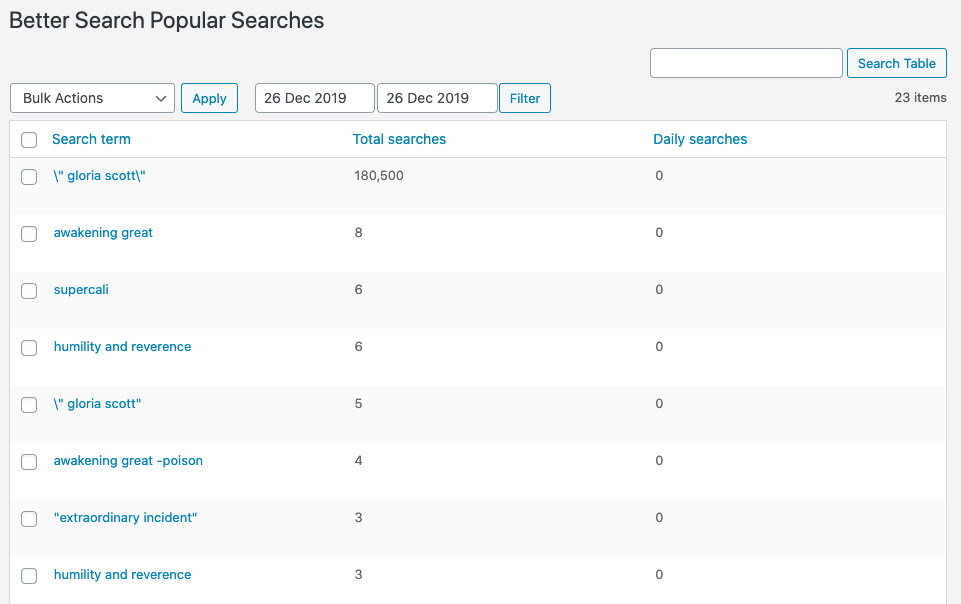
Better Search Popular Searches table in Admin 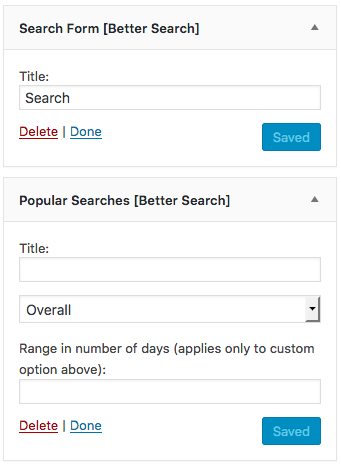
Better Search widget
Installation
WordPress install
-
Navigate to Plugins within your WordPress Admin Area.
-
Click “Add new” and enter “Better Search” in the search box.
-
Find the plugin in the list (usually the first result) and click “Install Now”.
Manual install
-
Download the plugin
-
Extract the contents of better-search.zip to wp-content/plugins/ folder. You should get a folder called better-search.
-
Activate the Plugin in WP-Admin.
-
Goto Settings > Better Search to configure
FAQ
If your question has not been covered here, please create a new post in the WordPress.org support forum. I monitor the forums regularly. If you want more advanced paid support, please see details here.
-
Will this work with any WordPress theme?
-
Yes! It replaces the default WordPress search and integrates with most themes out of the box.
-
Does it support WooCommerce or custom post types?
-
Yes, you can enable searching in any public post type from the settings.
-
How does it affect performance?
-
Better Search uses MySQL FULLTEXT indexes and includes internal caching. It also works well with external caching plugins.
-
Can I customise the search results template?
-
Yes, you can override the results template by copying the file to your theme directory. More info in the documentation.
-
What is the Profanity Filter?
-
It filters out selected keywords from being searched. Handy for family-safe sites.
Better Search includes a very cool profanity filter using the script from Banbuilder. You can customize which list of words you want to filter out from the Better Search settings page. Find the setting called “Filter these words:”. The plugin will automatically strip out partial and complete references to these words. You can turn the filter off by emptying the list.
-
How can I report security bugs?
-
You can report security bugs through the Patchstack Vulnerability Disclosure Program. The Patchstack team help validate, triage and handle any security vulnerabilities. Report a security vulnerability.
Reviews


Contributors & Developers
“Better Search – Relevant search results for WordPress” is open source software. The following people have contributed to this plugin.
Contributors

“Better Search – Relevant search results for WordPress” has been translated into 3 locales. Thank you to the translators for their contributions.
Translate “Better Search – Relevant search results for WordPress” into your language.
Interested in development?
Browse the code, check out the SVN repository, or subscribe to the development log by RSS.
Changelog
4.3.0
Release Date – 3 May 2026
Read more in the Better Search Pro 4.3.0 release post.
-
Features:
- [Pro] New: WP-CLI support with comprehensive command-line interface (search, cache, db, stats, settings, tables, status, stopwords commands).
- [Pro] Dashboard chart drill-down: click any bar in the daily searches chart to view the popular searches for that day.
- [Pro] New InnoDB conversion tool: convert the custom table engine with automatic FULLTEXT index recreation.
- [Pro] Scheduled reconciliation cron: a twicedaily job automatically syncs any published posts missing from the custom search index table.
- [Pro] New exclusion options: Exclude Front page and Exclude Posts page settings to optionally remove these pages from search results.
- [Pro] Network dashboard with popular searches chart and statistics table for multisite networks, accessible from the network admin menu.
-
Enhancements:
- [Pro] Multisite admin select-all checkboxes and post-copy URL cleanup are now handled by an external JavaScript file (via
wp_enqueue_script) instead of inline<script>blocks — improves compatibility with strict Content Security Policies. - [Pro] Copy-to-clipboard buttons on the tools and custom tables pages are now initialized automatically; no per-block inline script needed.
- [Pro] Improved short-term (≤3 character) LIKE searches to score full-word matches higher and order results by relevance.
- [Pro] Refactored fuzzy query shaping so
Query_Modifierowns score construction and request shaping, withFuzzy_Searchacting as the fuzzy scoring service. - [Pro] Rewrote soundex function, removed multisite LIMIT cap, and added content scoring for fuzzy search.
- [Pro] Added filters for fuzzy search truncation parameters.
- [Pro] Centralized exclusion term parsing logic in Helpers class.
- [Pro] Custom tables search now supports a FULLTEXT toggle, with improved LIKE-only relevance scoring when FULLTEXT is disabled.
- [Pro] Improved multisite search query composition: correctly unwraps fuzzy subqueries before UNION assembly and strips only top-level ORDER BY clauses, preventing malformed SQL.
- [Pro] LIKE term matching in custom tables search now uses an EXISTS subquery to avoid unbounded JOINs when the terms table is not already in scope.
- [Pro] Database check results are now cached within a request, reducing redundant
SHOW TABLESqueries on pages that check table status multiple times. - [Pro] Dashboard popular searches query result is now cached within a request to avoid repeated database hits.
- Refactored Media Handler with a strategy-based thumbnail resolution chain; now also supports ACF Image fields (Image Array, Image ID, Image URL) and plain text URL fields.
- Hardened search sanitization and boolean mode validation for more consistent results.
- Escaped output in settings forms for improved security.
- [Pro] Multisite admin select-all checkboxes and post-copy URL cleanup are now handled by an external JavaScript file (via
-
Bug fixes:
- [Pro] Fixed localized admin script data keys: removed erroneous
.strings.nesting that caused the cache-clear confirmation and error dialogs to displayundefined. - Fixed spinner alignment inside action buttons (now displays inline rather than floating).
- [Pro] Fixed fuzzy LIKE query SQL issues that could generate duplicate
IDfields in wrapped sub-queries. - [Pro] Fixed fuzzy search bypassing FULLTEXT exclusions.
- [Pro] Fixed inconsistent indentation and table alias qualification in multisite query composition.
- [Pro] Disabled fuzzy search when boolean operators are present to prevent conflicts.
- Fixed duplicate search query being executed on every non-seamless search page load.
- Fixed relevance percentages on paginated search results by stabilizing topscore handling across pages, while reducing unnecessary topscore queries when minimum relevance filtering is not in use.
- Fixed placeholder attribute escaping in text field rendering.
- [Pro] Fixed localized admin script data keys: removed erroneous
For previous changelog entries, please refer to the separate changelog.txt file or Github Releases page